


.svg)
Is Visual Mixing Killing Your Confidence?

Picture this: you line up the phase meter perfectly, throw the fader up, and wait for the audience to go crazy for the next big drop.
Then you see their faces screw up.
The beatmatch is a train wreck.
Sound familiar?
If you're relying on the screen to beatmatch, you're risking it all. Here's our guide to save your reputation and build your beatmatching skills.
The Silent Epidemic in Modern DJing: Visual Dependency
The advent of digital DJing has made it easier than ever for someone interested in DJing to get started. Nowadays, there are numerous DJ apps and software programs, such as Rekordbox, Traktor, Serato and Virtual DJ alongside affordable entry-level DJ controllers. It's easier than ever to get started with DJing, even on a low budget. As such, DJ equipment is common in many homes, as more people explore the joy of mixing.
Digital DJ programs make it easier to take your first steps as a DJ by automating beatmatching using beatgrids, phase meters and sync.
What is Beatmatching?
The fundamental skill of lining up the tempo and beat structure of two tracks so they play in perfect time. Before digital DJing, this was done entirely by ear, using the pitch fader. No waveforms. No numbers. Just listening. Click here to learn more about beatmatching.
What are Beatgrids?
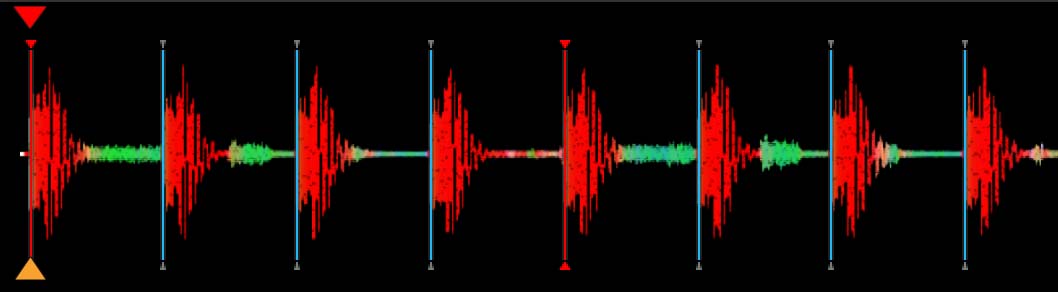
A beatgrid is a sequence of vertical lines seen overlayed a track's waveform that visually represents the metronome. The lines should align with the beat and tempo of the track, aka what you would clap along to. The program will analyse each track and set a beatgrid from the first beat, usually a kick drum. If the program does this correctly it should be at the start of the transient as seen below. The software assumes every track has a steady, constant tempo but many tracks don't, more about this later. Click here to master how to beatgrid your tracks with Rekordbox.
What are Phase Meters?
That little set of vertical lines (often red for the first beat of the bar and white for the 2nd, 3rd and 4th beat of the bar) that shows you how aligned two tracks are. if you're using a Pioneer DJ unit such as a CDJ or XDJ look in the centre top of the screen for this. Note that older models may have blocks rather than a grid, even older decks, nothing at all! DJs will often push the jog wheel until they both align to obtain a beatmatch visually.
What is Beat Sync?
The button that instantly matches tempo and beatmatch for you. It will match the BPM and sync up your phase meter, without the need for the tempo fader or jog wheel. However, this doesn't work if the beatgrid is wrong to begin with.
The Problem: You're DJing With Your Eyes, Not Your Ears
Modern DJ software is incredible. Waveforms, beatgrids, key analysis, sync buttons, it's never been easier to mix. The problem is, beatgrids, phase meters and beat sync can all go wrong. In addition, DJs need to use varied setups and some older ones simply don't provide those crutches. Furthermore, DJs who use their ears rather than their eyes will achieve a tighter, more professional beatmatch and look more confident doing so. Here are some common problems that visual DJs will encounter:
Beatgrid Analysis Issues
Phase meters and beat sync all work because of the beatgrid, when that's wrong the whole house of cards tumbles. Sometimes, when programs like Rekordbox analyse the beatgrid, they can make mistakes.
Beatgrid Not on the Transient?
One of the most common issues is where your DJ software doesn't place the beatgrid in the correct place on the transient. This means the phase meter is not in the right place either, and visual beatmatching or sync simply won't work.

Wrong Track BPM?
Sometimes, the program will assign the wrong BPM to the track. It can by slightly off, or wildly off! If there is even the slightest error your phase meters and beat sync won't work properly and you'll need to use your ears.
Track Changes BPM?
Some tracks actually change BPM in the middle of the song. These are called tempo-change tracks, and they are becoming more common. When this happens it will throw the grid out of alignment and the BPM shown on the screen won't reflect the real BPM of the track.
Live Drummer?
Most modern tracks has one consistent BPM from start to finish but older tracks or tracks with live drummers will have subtle variations in tempo. While there are some work arounds if you know your beatgrid tool bar, for many DJs this will cause absolute chaos.
Click here to learn how to solve common beatgrid issues
Click here to join our monthly Rekordbox Masterclass
DJ Equipment Issues
Even if you have perfectly beatgridded all your tracks, you can still encounter issues with your DJ setup. Phase meters and beat sync only work when your decks are networked together (linked). However, the link mechanism can easily fail. For example, one slight knock of the networking cable can disconnect the link and you can wave goodbye to your phase meter and beat sync option. Furthermore, older setups might not have phase meters or sync as an option.
Another common issue is that the DJ before you might be using vinyl, another program or simply didn't bother to beatgrid their tracks. How are you going to mix in to their music if you're relying on beat sync?
Even if your phase meters and beat sync options are working it can still have issues to do with the complex user interface, firmware and compatibility hurdles.
Many new DJs also don't realise that it's even harder to beatmatching in a loud club. Massive sound systems and acoustics can make it a challenge to beatmatch at your gigs compared to in your small DJ studio. This is one of the reasons we organise DJ gigs for all our DJ course graduates, so they can overcome the difficulties of beatmatching in a club environment.
The Solution: Stop Watching. Start Listening.
Beatmatching isn't a visual skill. It's an auditory one. And like any muscle, your listening ability can be trained and strengthened. Now you can see why we called ourselves 'DJ Gym'!
We believe that good DJs will dedicate time to practice beatmatching by ear. This ethos allows our DJs to become confident behind the decks and free up time to concentrate on creative mixing and providing an extraordinary show.
The good news? You don't need to practice for hours every day. Even 30 minutes of training a week can give you incredible benefits.
Here are the exercises you should add to your ear workout.
Jog Wheel & Reveal
Start with two simple house tracks and loop the first eight bars. Set their tempos so they are both the same BPM. Hit play simultaneously so they are both beatmatched. Now cover the phase meter on the screen and spin the jog wheel so that the tracks are no longer aligned. Using your ears, turn the wheel until you think the beats are matched. Now uncover the phase meter to see how close you are. Repeat this until it's easy. Exit the loop to make it harder by allowing the track to move into more complexity.
Jog Wheel & Reveal + EQ
Using the same method as above, you can train your ears by changing the EQ levels. Try the Jog Wheel Reveal exercise with only the Low EQ up, or the High or Mid. You can even try a combination. This will force you to listen to more nuanced clues.
Jog Wheel & Reveal + Different Rhythms
Now you're getting more advanced, you can try harder tracks. Try different genres, such a hip-hop, drum and bass, breaks, dubstep, etc.
Jog Wheel Catchup
Go back to your house loop. Set the BPM so the tracks are one BPM apart, for example, 120BPM on the left and 121BPM on the right. Hit play simultaneously so they are both beatmatched and notice how they start to drift apart. Use the jog wheel to try and keep them in sync, you'll need to fix the beatmatch on repeat. Each time your do this, you're training your ears.
Pitch-Shifting
The holy grail of beatmatching by ear is learning how to pitchshift. Pitchshifting is when a DJ uses the pitch (tempo) to determine the BPM and align the beats all in one motion using a complex movement based on trial and error. This is how vinyl DJs beatmatch, and is the hallmark of a truly experienced and professional DJ. Naturally pitchshifting is part of our Advanced DJ Course curriculum and we can provide 1-1 training on this method.
Want to Go Deeper? Train With DJ Gym & LSA
At DJ Gym, you won't just train your ear muscles, you'll become a DJ athlete. Along with our partner, London Sound Academy, we train the best in the business. Our courses are highly rated and used by hobbyists and professionals alike. Anyone who wants to be top of the game will join our DJ courses.
Here's what you'll get when you train with us:
✅ 1‑2‑1 Coaching – Personal feedback on your beatmatching, phrasing, and ear training. We listen to your mixes and fix what you can't hear yet.
✅ Structured Ear Workouts – Progressive drills that take you from "sync dependent" to "blindfold confident."
✅ Real‑Gear Practice – Learn on industry standard equipment. No laptop crutches. Just you, the decks, and your ears.
✅ DJ Gigs – Because nobody gets better practicing alone in their bedroom forever.
Ready to stop looking and start listening?
👉 Check our 1‑2‑1 DJ courses here
👉 Click here for DJ courses at London Sound Academy
The DJ Gym Team


